Z3X Samsung Tool Guide 2026: Box vs. Online & Android 14 Workflows
Quick Summary:
- Hardware vs. Software: The physical Z3X Samsung Tool PRO box is now primarily a legacy tool for pre-2023 devices. For Galaxy S23/S24 and Android 14, you must use the credit-based SamsTool Online client.
- Cost of Business: Modern FRP removal requires server credits. Expect to pay approximately $5–$7 USD per unlock on flagship models.
- FRP Reality: Free “Test Mode” (
*#0*#) exploits are patched on most security levels after June 2023. - Patch Cert Risk: Do not attempt Z3X patch cert samsung operations on devices with “KG LOCKED” or “RMM ACTIVE” states; this leads to immediate boot loops.
- Download Safety: Only download the Z3X Shell from the official repository to manage driver authentication and avoid malware-bundled “cracked” versions.
Facing a locked device when you need it most can be a significant obstacle to your shop’s efficiency. For years, the trusty gold Z3X box was the backbone of independent Samsung workflows. But recently, faced with a queue of Galaxy S23s or S24s running Android 14, the old routine has failed. The software throws errors, the “Test Mode” exploit doesn’t trigger, and Google searches often lead to sketchy cracked loaders or confusing reseller pages.
The ecosystem has split: the hardware dongle you likely own is no longer the master key for modern flagship devices. To avoid misapplying outdated or model-incompatible methods, you can refer to our complete Samsung FRP Bypass Guide (2026), which breaks down the correct FRP workflow for each Samsung device class—flagships, tablets, and MTK-based budget models.
This guide clarifies exactly when to revive your old Z3X box Samsung activation and when to switch to the Z3X Samsung tool online credit system. We provide a validated workflow to help you bring success rates back above 90% while avoiding the costly “Network NG” errors common with newer security patches.
Decision Guide: Z3X Box vs. SamsTool Online vs. Chimera
The Z3X ecosystem for Samsung repair has bifurcated into two distinct operational methods: the legacy physical hardware known as Samsung Tool PRO and the newer, credit-based SamsTool Online subscription. Understanding which tool applies to your specific repair job is critical to maintaining profitability.
The confusion often lies in the interface. “SamsTool Online” is not always a separate piece of software. It largely refers to the service that consumes credits. You can access these server functions through the standard Samsung Tool PRO interface (login required) or, for specific newer operations, via a standalone login client.
If you service budget J-series or older A-series phones (Galaxy A10/A20), the physical box activation offers unlimited offline servicing. However, for the S23/S24 series on Android 14, the box software cannot bypass the new bootloader security without server aid. You generally do not need to buy a new box activation for an S24; you need credits.
2026 Samsung Repair ROI & Cost Analysis
Technicians often ask, “Is it cheaper to buy the box update or just pay for credits?” Here is the math based on average 2026 market pricing (approx. $1.10–$1.30 USD per credit).
| Feature | Z3X Box (Legacy PRO) | SamsTool Online | Chimera Tool |
| Primary Use | Pre-2023 Models (Unlimited) | 2023-2026 Flagships | Mixed Fleet Support |
| Hardware Req | Physical Box/Dongle | None (Login only) | None (Login only) |
| Cost Structure | Yearly Activation (~$60) | Per-Operation Credits | Yearly License (~$170) + Credits |
| FRP Cost (Avg) | $0.00 (Test Mode) | ~5 Credits ($6.00) | ~65 Credits (Chimera Currency) |
| Read Codes | Free (Old Models) | ~3 Credits ($3.50) | Varies by Model |
| Android 14 FRP | Limited (Test Mode) | High Success (Server) | High Success (Server) |
| Risk Level | Moderate (Manual files) | Low (Auto-server) | Low (Auto-detection) |
The “50 Phones a Month” Calculation
If your shop sees a high volume of modern Samsungs, the math changes:
- Scenario A (20 older phones, 5 newer phones): Stick with Z3X Box. The unlimited free unlocks on older units justify the activation. Pay as you go for the 5 newer ones ($30 total in credits).
- Scenario B (25 new S23/S24 phones): A recurring license tool like Chimera or purely credit-based SamsTool is necessary. The box activation is wasted money here because it cannot touch the S24 without credits anyway.
Where to Buy Z3X Credits Safely
One of the biggest risks in the credit-based workflow is the purchase itself. There is no “Buy Credits” button inside the software. You must purchase them from a third-party reseller, which opens you up to scams.
Authorized Sources
To avoid phishing sites that steal your login credentials:
- GsmServer: A long-standing, reputable distributor for unlocking hardware and credits.
- Official Reseller List: Check the official Z3X Team website under the “Resellers” tab. If a site isn’t listed there, do not use it.
How to Load Credits
- Purchase a credit pack (usually sold in batches of 10, 30, or 50).
- The reseller will ask for your Z3X Username. This is the username you created inside the Z3X Shell or software, not your email address.
- Once the reseller processes the order (usually 15 minutes to 24 hours), the credits are deposited directly into your server account.
- Verification: Open Samsung Tool PRO, go to the Settings/Server tab, enter your login details, and click “Check Account.” Your balance should reflect the purchase.
How to Safely Download Z3X Shell & Authenticate Drivers
The only secure method to acquire the software is through the official Z3X Shell, which acts as a download manager and card validator. This tool prevents the installation of malware-bundled binaries common on third-party forums.
Navigating the web for a Z3X shell download often exposes technicians to “cracked” loaders. These unauthorized versions frequently contain outdated binary definitions that can hard-brick a device during firmware flashing by writing corrupt boot sectors.
Step-by-Step Installation Procedure
- Download Z3X Shell Only: Obtain the lightweight Shell client from the primary official repository. Do not download the heavy Samsung Tool PRO executable directly from a browser search result.
- Install Smart Card Drivers: Before launching the Shell, connect your box. If Windows Device Manager shows a yellow exclamation mark, install the Alcor/Realtek card drivers included in the Shell installer package.
- Access Support Files: Open Z3X Shell and navigate to the
Support Filestab. This connects directly to the developer’s server. - Select Software: Navigate to
Software>Samsung Tool PRO. Download the latest executable here. The Shell automatically verifies the MD5 checksum to ensure the file is not corrupted.
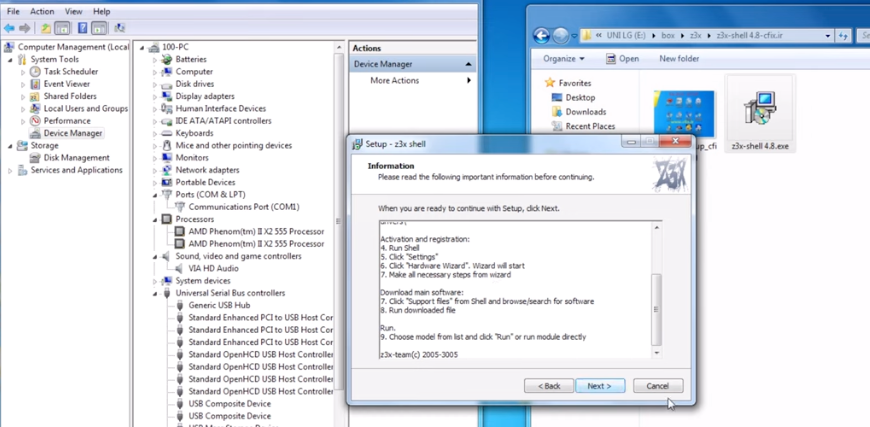
Install Z3X Shell and Your Samsung Tool
Verifying Your Installation
Once installed, launch Samsung Tool PRO as an administrator. The log window should display “Card Found” and “System Integrity Verified.” If you see errors regarding “server connection” on a simple startup, you may have a firewall issue or a counterfeit smart card.
FRP Removal on Android 13/14: Does Z3X Still Work?
Z3X can successfully perform Z3X Samsung FRP removal operations on Android 13 and 14, but the success rate of free exploits depends heavily on the device’s security patch level rather than the OS version.
The classic “Test Mode” exploit (dialing *#0*# in the emergency dialer) relies on an ADB enablement vulnerability. Patches released after June 2023 have closed this vulnerability on almost all devices. If you attempt this method on an updated S23, the software will report “OK,” but the phone will remain locked because the ADB command is rejected by the OS.
The “Trap” Device: Samsung Galaxy S21 FE
Be wary of transition models like the Galaxy S21 FE. While it launched with older software, almost all units in circulation have updated to Android 14/One UI 6.1. Technicians often treat it like an older S21 and waste time on the free method. Treat the S21 FE as a “Credit Required” device to save time.
Android 13/14 FRP Capability Matrix
| Android Version | Security Patch Date | Test Mode (Free) | Server Credit (Paid) |
| Android 11/12 | Pre-2023 | High Success | Supported |
| Android 13 | Jan 2023 – May 2023 | Moderate Success | Supported |
| Android 13 | June 2023+ | Patched (Fails) | Recommended |
| Android 14 | All Versions | Patched (Fails) | Recommended |
For devices that require the paid method, ensure the phone is in Download Mode or normal mode as specified by the SamsTool Online instructions, not the legacy ADB mode.
Patch Cert & IMEI Repair: Navigating KG/RMM Locks
The z3x patch cert samsung operation creates a digital signature that allows the modem to accept a repaired IMEI. However, modern Samsung security (Knox Guard) has made this highly restrictive.
Many technicians attempt to repair IMEI / EFS on newer devices only to find the phone refuses to boot or loses signal immediately after a reboot. This is rarely a software bug; it is a failure to check the device’s pre-conditions.
⚠️ Compliance Notice: Legal Risks
Warning: Changing the IMEI of a mobile device is illegal in many jurisdictions, including the UK (Mobile Telephones (Re-programming) Act) and several other regions. In the United States, the DMCA provides exemptions for unlocking carrier restrictions, but re-writing an IMEI (identity change) is legally complex and often prohibited if done to obscure the device’s history. Ensure you are performing legitimate repair (restoring original IMEI) rather than alteration.
Expert Insight: The Pre-Flight Checklist
Before attempting any Patch Cert, you must boot the device into Download Mode (Volume Down + Volume Up + Insert USB Cable). Look closely at the text in the top-left corner of the blue/green screen.
- KG STATE: Look for the line
KG STATE.- Safe:
CheckingorCompleted(or line is missing on very old phones). - Danger:
LOCKED,ACTIVE, orPRENORMAL. - Result: If you attempt to patch a device with
KG STATE: LOCKED, the phone will soft-brick. This indicates the device is finance-locked or managed by a corporate MDM.
- Safe:
- OEM LOCK: Patch Cert requires Root access. You cannot root a Samsung device with a locked bootloader. If
OEM LOCKisON(LOCKED), the operation is impossible. - The Log Failure: If you ignore these checks, your Z3X log will likely show a vague error like:
Checking server... OK Calculating... OK Writing data... Error: Security Policy Check FailedThis error specifically means the hardware security fuse (Knox) rejected the unsigned binary modification.
Why Legacy Methods Fail: The Shift to Server-Side Checks
Modern Samsung devices utilize hardware-backed security zones, specifically Knox Vault, which isolates sensitive data from the main Android OS. This renders legacy memory manipulation methods obsolete.
In the past, tools could inject a combination file or exploit the modem’s diagnostic port because verification logic was local. With the introduction of RMM (Remote Mobile Manager) and KG (Knox Guard), the device checks a remote Samsung server during boot. If the server reports the device as “Locked,” the hardware physically disables the functionality needed for custom binaries.
Consequently, local “cracks” or modified Samsung Tool PRO loaders cannot bypass the lock because the “key” is no longer on the phone—it is on the server. This is why you must move toward legitimate, server-authenticated methods (credits).
Frequently Asked Questions (Z3X Support & Credits)
Is Z3X Samsung Tool PRO still supported, or do I need SamsTool Online now?
Samsung Tool PRO is still supported for legacy operations, but SamsTool Online (the credit service) is required for the latest Android 14 security patches. You often access the credit features through the PRO interface.
What is the average cost per credit?
As of 2026, credits typically cost between $1.10 and $1.30 USD depending on the quantity purchased. An FRP unlock usually consumes 5 credits ($6.00 average).
Where do I safely buy credits?
Purchase only from authorized resellers listed on the Z3X Team website, such as GsmServer. Avoid “instant delivery” promises from unknown websites.
Can Z3X remove FRP on Android 14 Samsung devices without credits?
No. The free *#0*# test mode method works only on devices with security patches older than June 2023. Android 14 devices almost exclusively require the credit-based method.
How does Z3X compare to Chimera for new Galaxy models?
Z3X is generally more cost-effective for high-volume legacy repairs. Chimera is better for “mixed fleet” support (LG, Huawei, Samsung) and newer models, but requires a more expensive annual license plus credits.
Will Patch Cert repair still work on the latest security?
Patch Cert will fail if the device has an active KG (Knox Guard) lock or a locked bootloader. You must ensure the KG STATE is “Checking” or “Completed” before attempting the repair, or the device may soft-brick.
Can I use Z3X without the physical box if I subscribe to SamsTool Online?
Yes, for specific credit-based operations. You can log in with your username/password to the SamsTool client without the dongle, but legacy box functions (like older free unlocking) will not work without the hardware.
Conclusion
The confusion surrounding the Z3x Samsung tool stems from its evolution, not its obsolescence. While the days of unlimited offline unlocking for flagship devices are over, the tool remains a vital asset when applied correctly. By distinguishing between the legacy Samsung Tool PRO box for older inventory and the credit-based SamsTool Online for Android 14 devices, you can stop wasting money on failed activations and bricked motherboards.
Don’t let the new security protocols paralyze your workflow. Verify your device’s KG STATE in Download Mode, purchase your credits from an authorized source like GsmServer, and execute the repair with confidence. If you are ready to modernize your shop’s capabilities, start by downloading the official Shell and verifying your drivers today.
- How to Bypass FRP Using TalkBack in 2026: An Honest Guide
- How to Use Easy Flashing FRP Bypass 8.0 APK
- Google FRP Lock Bypass with Odin: The Real Method for 2026