Moto G Play FRP Bypass (2026 Guide): Why No-PC Methods Fail & The Working PC Solution (XT2093)
Are the ‘No-PC’ bypass tricks failing on your Moto G Play? It’s not just you—security updates have changed the game. This guide explains exactly why older exploits like TalkBack are patched on the XT2093 and walks you through the comprehensive PC-based solution to regain access safely.
If you’ve spent the last hour trying to bypass the Google Lock on your Moto G Play using “TalkBack” gestures or “Emergency Dialer” codes, you likely already know the bad news: they don’t work anymore.
On nearly every Moto G Play (XT2093) running updated Android 10 software, Motorola has patched these old loopholes. Most online guides haven’t caught up, leading you on a frustrating chase. This is part of a broader pattern across Motorola devices.
We’re doing things differently. Instead of relying on glitchy exploits, this guide covers the only guaranteed method for 2026: resetting the device using the official manufacturer software.
Quick Verdict:
If your Moto G Play has security patches from late 2021 or newer, “No-PC” exploits (like Gboard or TalkBack) are blocked. The only safe way to bypass the lock is to re-flash the device using the Motorola Rescue and Smart Assistant (LMSA) on a Windows computer.
Step 1: Identify Your Moto G Play Model & Version
How to Access Fastboot Mode
- Completely power off your Moto G Play.
- Press and hold the Volume Down button and the Power button simultaneously.
- Continue holding both buttons until the fastboot screen appears, which shows an Android robot logo and device information.
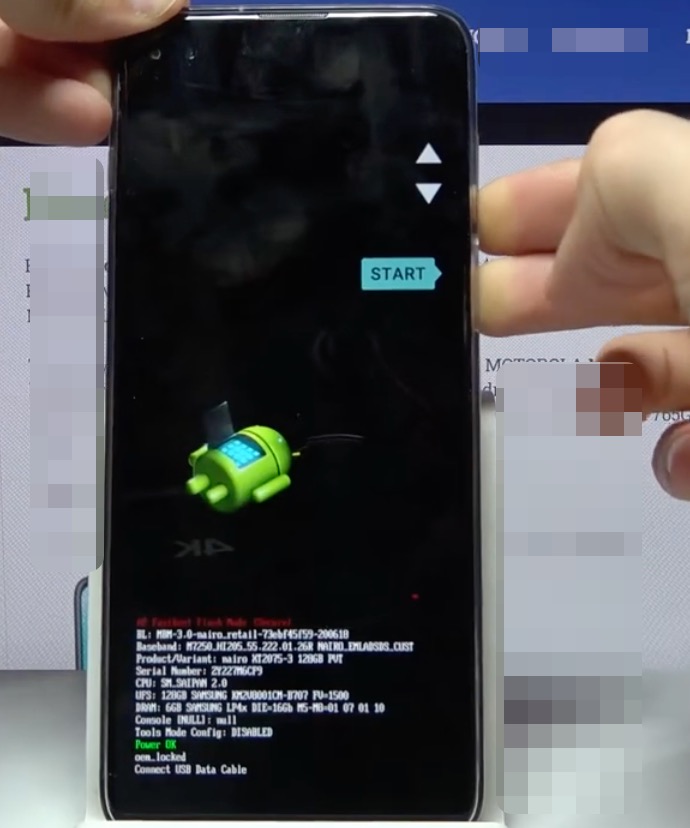
Find the exact model and software version to identify the correct FRP bypass method
Look for two things:
1. Product/Variant: Confirm it says XT2093-1, XT2093-3, or similar.
2. Software Version: Look for a date in the text string.
- If the date is late 2021 – 2025: You MUST use the PC method below.
- Note: If you see Android 13 or 14, this guide implies a different process. Please refer to our Moto G 5G FRP Bypass (Android 13/14).
Step 2: The Solution – Remove Google Account Using PC (LMSA)
This is the standard, official method for 2026. We will use the Motorola Rescue and Smart Assistant (LMSA) tool. This tool communicates with your phone to factory reset it deeper than a standard wipe, removing the FRP lock effectively.
⚠️ Warning: Data Loss
This process will completely wipe the phone. Since you are likely locked out anyway, this is usually acceptable, but please be aware that all local data will be erased.
Prerequisites
- A Windows PC (Windows 10 or 11 recommended).
- A reliable USB Data Cable.
- A stable Wi-Fi connection (The tool needs to download approx. 2-3GB of firmware).
Phase 1: Install Drivers & Software
- Download Motorola Drivers: Go to the Motorola support site and download the “Motorola Device Manager” or USB Drivers. Install them and restart your PC.
- Download LMSA: Download the Rescue and Smart Assistant tool from the Lenovo/Motorola support page.
- Create a Lenovo ID: When you open the tool, you will be asked to sign in. Create a free Lenovo ID (or sign in with Google) to access the “Rescue” features.
Phase 2: The Rescue Process
- Open the LMSA tool on your PC and click the large Rescue button.
- Select Phone Rescue.
- Boot your Moto G Play into Fastboot Mode (Volume Down + Power) if it isn’t already.
- Connect your phone to the PC via USB.
- The software should detect your device (e.g., Moto G Play). If not, ensure your drivers are installed correctly. (For more on driver issues, see our [Guide to ADB & Fastboot Drivers]).
- Click Download to get the matching firmware for your specific model.
- Once downloaded, click Rescue / Proceed.
- Do not disconnect the phone. The process will take 5-10 minutes.
Once the process reaches 100%, your phone will reboot. You will be taken to the initial setup screen, but the Google Account verification lock will be gone (or you will see a “Skip” button).
Why “No-PC” Methods (Gboard/TalkBack) Don’t Work
The “Gboard Exploit” (Patched)
The old trick involved using the keyboard’s “Web Search” or “Microphone” permission to trigger a browser opening.
- The Reality: On Android 10 builds released after June 2021, Motorola disabled the ability to launch the browser from these menus. If you tap the microphone, it simply denies access.
- The Result: You hit a dead end after 20 minutes of trying.
The Danger of FRP Bypass APKs
Even if you manage to open a browser, older guides ask you to download “Bypass FRP APKs” from random websites.
- Security Risk: These files are unverified and often contain malware.
- Irresponsible Advice: We generally advise against installing unknown APKs. Using the official Motorola LMSA tool is 100% safe and keeps your device integrity intact.
Comparison: PC vs. No-PC Methods
| Criteria | No-PC Method (Gboard/TalkBack) | PC Method (LMSA Tool) |
| Success Rate (2026) | < 5% (Fails on updated phones) | 99% (Official Solution) |
| Time Required | High (Trial and error) | Moderate (Download + Flash) |
| Safety Risk | High (Malware from APKs) | Safe (Official Software) |
| Difficulty | High (Complex gestures) | Low (Automated software) |
For anyone with a Moto G Play 2021 FRP bypass challenge, the PC-based tool is the only recommended solution, similar to other patched versions such as Android 11 FRP bypass.
Troubleshooting & FAQ
Q: The Rescue Tool says “Device not supported” or fails to connect.
A: This is almost always a driver issue. Try a different USB cable, a different USB port (use a USB 2.0 port if possible), or reinstall the Motorola USB drivers. Ensure the phone is sitting on the Fastboot screen, not a black screen.
Q: Is bypassing FRP legal?
A: Bypassing FRP is generally acceptable if you legally own the device (e.g., you forgot your own password or bought a used phone with proof of purchase). However, performing this on a stolen device is illegal.
Q: Can I downgrade my Android version to make the old hacks work?
A: We strongly advise against downgrading. Motorola devices have a security feature called “Anti-Rollback.” If you try to flash an older Android version, you will likely hard-brick your phone, making it permanently unusable. Stick to the LMSA tool, which flashes the current correct software.
Need More Help?
If you successfully unlocked your Moto G Play, you might want to optimize it. Check out our other guides: